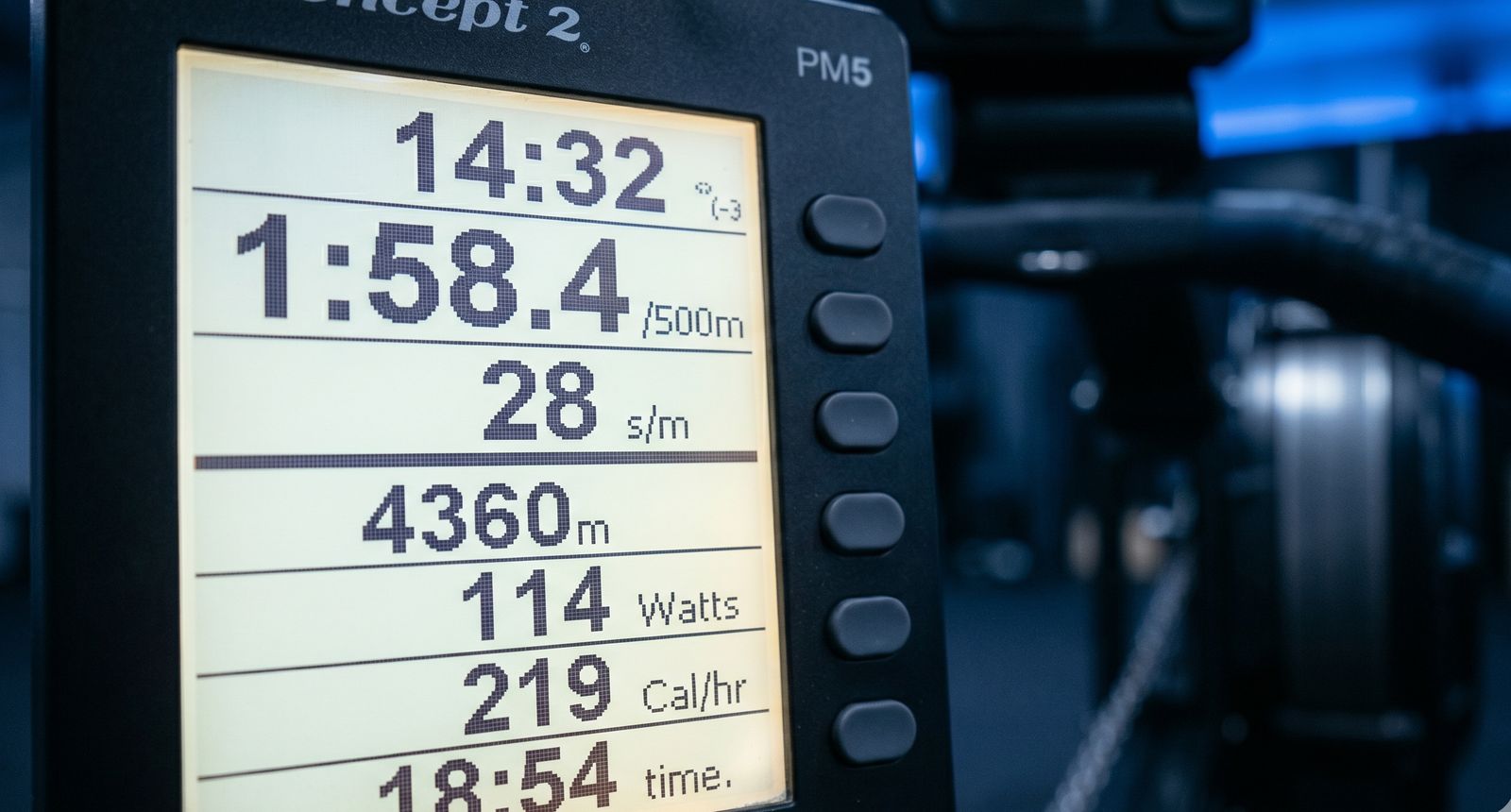
The Concept2 performance monitor shows a lot of numbers. If you're new to indoor rowing, it can be overwhelming. Here's what every number means and which ones actually matter.
The numbers that matter most
Out of everything on the screen, focus on these three:
-
Split (pace per 500m): This is your speed. Lower is faster. Displayed as minutes:seconds per 500 meters. If you see 2:00.0, that means it takes you 2 minutes to row 500 meters at your current pace.
-
Stroke rate (s/m): How many strokes you take per minute. Displayed as a number like 24 or 28. Lower for steady state, higher for racing.
-
Distance or time: Depending on your workout type, you're either counting meters up or time down.
That's it for now. Watts, calories, and the other numbers are useful later, but splits and rate are what drive improvement.
Understanding pace (split)
The split is the single most important number on the monitor. It tells you how fast you're going, normalized to 500 meters.
- 2:30/500m is a common beginner pace
- 2:00/500m is solid recreational fitness
- 1:45/500m is competitive club level
- 1:30/500m is approaching elite
Your split changes with every stroke. The number on screen is usually a rolling average over the last few strokes. Don't chase every fluctuation - look for consistency.
Don't want to read the monitor yourself? ErgManiac's photo scan reads the screen for you and captures every number automatically.
Stroke rate and what it tells you
Stroke rate is how many times you complete the rowing stroke in one minute. It's not a measure of effort - it's a measure of rhythm.
- 16-20 spm: Easy steady state. Long, slow strokes.
- 22-26 spm: Moderate intensity. Tempo work.
- 28-32 spm: Race pace for most recreational rowers.
- 34-38 spm: Sprint. Short pieces only.
A common beginner mistake is rowing at 28-30 spm for everything. If you're doing steady state, aim for 18-22. The power comes from your legs, not from pulling faster.
Watts vs calories vs split
The monitor can display your output in three ways:
- Split (pace/500m): The standard for rowing. This is what coaches and training plans reference.
- Watts: Raw power output. Useful for comparing across sports (cycling, etc.) but rarely used in rowing training.
- Calories/hour: Displayed by default on many ergs. Looks impressive but is misleading - the cal/hr number is a theoretical maximum, not what you actually burn.
Recommendation: Switch your monitor to display pace/500m. Press "Units" to cycle through the options. All rowing training is based on splits.
The main display screens
During a workout
The default screen shows:
- Large number: Your current pace (split), watts, or cal/hr
- Time: Elapsed or remaining
- Distance: Total meters or meters remaining
- Stroke rate: Current spm
- Heart rate: If you have a heart rate monitor connected
After a workout (summary)
When you finish, the monitor shows your overall stats:
- Total distance and time
- Average split
- Average stroke rate
- Average heart rate (if connected)
This is the screen that ErgManiac's photo scan reads. Snap a photo and all the data gets logged automatically.
Interval detail screen
If you did intervals, press "Menu" after finishing to see per-interval breakdowns. This shows:
- Each interval's distance, time, and split
- Rest times between intervals
- Stroke rate per interval
This is gold for tracking interval consistency. Photo scan can read this screen too, capturing the full breakdown.
Drag factor
Drag factor is a number (usually between 90 and 200) that represents the resistance of the flywheel. It's NOT the same as the damper setting (the lever on the side).
- Damper setting: The physical lever (1-10). This changes airflow to the flywheel.
- Drag factor: The actual resistance, which depends on damper setting plus environmental factors (dust, temperature, altitude).
For most adults, a drag factor between 115-130 is appropriate. You can check your drag factor in the "More Options" menu.
Higher drag factor is not better. It just makes each stroke heavier. Elite rowers typically use 120-130.
What about heart rate?
If you connect a Bluetooth heart rate monitor (chest strap recommended), the PM5 displays your heart rate during the workout. This is useful for:
- Staying in the right training zone during steady state
- Tracking recovery between intervals
- Monitoring overtraining (resting HR creeping up over weeks)
Heart rate data is especially valuable when combined with training zones. Learn about the 5 rowing training zones and how heart rate fits into each.
Getting started
Now that you understand the monitor, the next step is building a training habit. Check out our beginner 8-week plan or our guide to your first 30 days on the erg.
ErgManiac tracks all your metrics over time. Photo scan the monitor after workouts and watch your trends build automatically.